

Solved

can I see the business capability catalogue as a non admin?

  • December 20, 2024
  • 2 replies
  • 102 views


I am in my early onboarding and would like to explorer the business capability catalgoue, I in onboarding course #2 the below instructions, but I wonder if I with a “member” profile maybe cannot access it? Or maybe I just cannot find the “administration” tab?


How: 
Open your workspace(opens in a new tab), navigate to "Administration" and click "Reference Catalogs". Find a detailed description here.(opens in a new tab)

Best answer by Wiam El Fatihi

Hi Mads,

Access to the Business Capability Catalogue or The reference catalog is managed through administration. As a Member, you currently do not have access to these features.

Please reach out to your LeanIX Admin or your Customer Success Onboarding Manager to request a role change from Member to Admin.

2 replies

Forum|alt.badge.img
  • Royalty For Loyalty
  • December 20, 2024

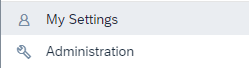
The administration area is right under “my settings” and is accessed by clicking on your picture in the upper right corner of the screen. I’m pretty certain you need to be an admin to see the administration area.


Wiam El Fatihi
Community Manager
Forum|alt.badge.img+2
  • Community Manager
  • Answer
  • December 30, 2024

Hi Mads,

Access to the Business Capability Catalogue or The reference catalog is managed through administration. As a Member, you currently do not have access to these features.

Please reach out to your LeanIX Admin or your Customer Success Onboarding Manager to request a role change from Member to Admin.