
Solved

Select subtypes through Json in custom KPI

  • July 31, 2025
  • 5 replies
  • 178 views

Forum|alt.badge.img

For a custom KPI I want to create a Json filter on Application subtype ‘Deployments’ but I can't get it to work. 
As the subtype is showed as a field in the Factsheet I added it as fieldName “subtype” and fieldValue “Deployment”  but this gives an error. 
Is the subtype not a field? And any idea how to note it in Json?


{

            "type": "none",

            "filters": [

                {

                    "type": "equals",

                    "fieldName": "subtype",

                    "fieldValue": "Deployment"

                }

            ]

        },

Best answer by Roald Roos

We had some help and needed to change the fieldname:


"type": "any",

            "filters": [

                {

                    "type": "equals",

                    "fieldName": "category",

                    "fieldValue": "deployment"

5 replies

Carsten
Forum|alt.badge.img+1
  • Everlasting Love
  • July 31, 2025

Hi ​@Roald Roos ,
here it is:
query MyQuery {
  allFactSheets(
    filter: {facetFilters: [{facetKey: "FactSheetTypes", keys: ["Application"], operator: OR},{facetKey: "category", keys: ["Application"], operator: OR}]}
  ) {
    edges {
      node {
        id
        fullName
      }
    }
  }
}

Best regards,

Carsten


Carsten
Forum|alt.badge.img+1
  • Everlasting Love
  • July 31, 2025

Hi ​@Roald Roos ,

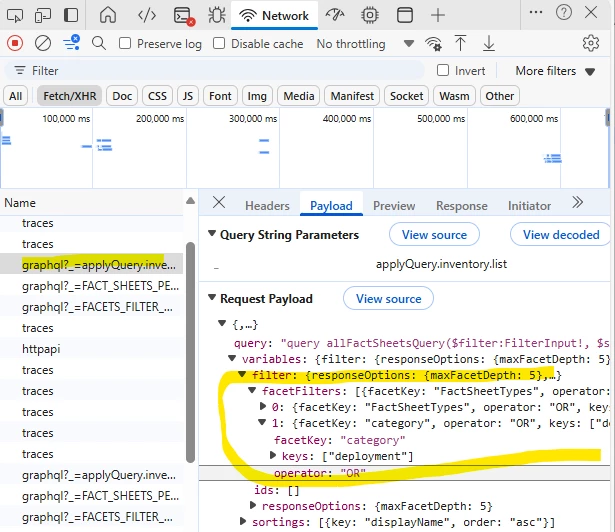
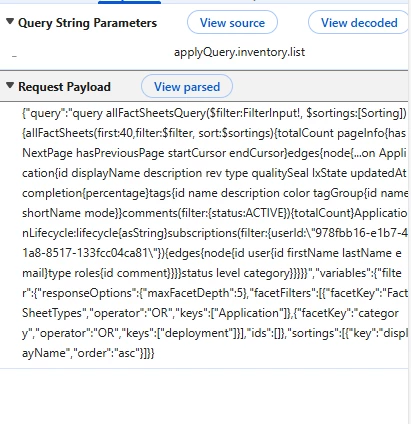
if you have problems in creating filters, you can build it in the inventory:
 

With F12 open the Browser Debugger an select Network (and refresh the query execution):


or view it as source:
 

Best regards,
Carsten


  • August 11, 2025
  • Confirm the exact field name in your API docs or via the Factsheet metadata

  • Use the precise field name (often not just subtype)

  • Test with different values like "Deployment" vs "Deployments" (case-sensitive)

  • If still errors, try filtering by related object or expand your JSON structure accordingly


Forum|alt.badge.img
  • Author
  • Royalty For Loyalty
  • Answer
  • August 11, 2025

We had some help and needed to change the fieldname:


"type": "any",

            "filters": [

                {

                    "type": "equals",

                    "fieldName": "category",

                    "fieldValue": "deployment"


neal_richards
Forum|alt.badge.img
  • Here To Stay
  • August 11, 2025

I thought custom KPI with graphql queries was deprecated and that you could only create custom kpi via filters now?